Why are SMBs Switching to All-in-One Management Software in 2026?

You are fighting a silent, expensive battle against App Fatigue, often called Franken-stack.
It’s a cobbled-together mess of disconnected tools that don’t talk to each other. You end up entering the same client data three times, paying five different subscription bills, and still having no idea if that invoice was actually sent. You are searching for business management solutions that actually solve SMBs problems rather than creating new ones.
It involves moving to a unified small business management software, an operating system designed to handle your entire workflow from lead to cash.
In this comprehensive guide, we will break down why the “app fatigue” era is costing you thousands, how a business management system can centralize your operations, and review the top platforms for 2026.
What is “All-in-One” Business Management Software?
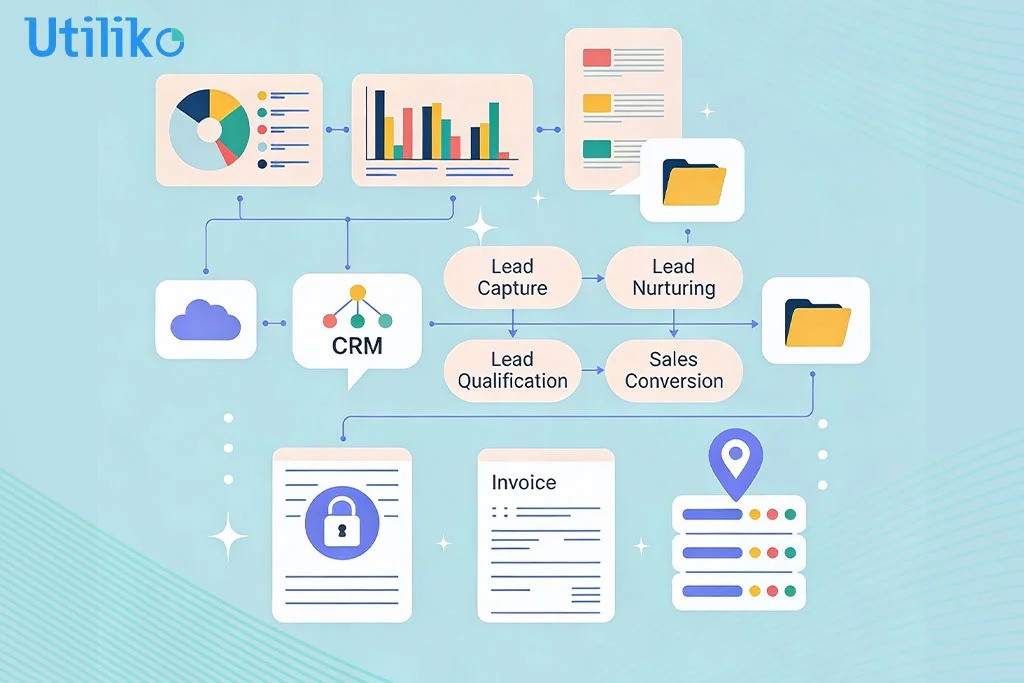
All-in-one business management software is a unified platform that combines essential business functions: CRM, Project Management, Accounting, HR, and Support, into a single operating system.
Unlike standalone apps (which only do one thing), integrated business software ensures that data flows automatically across your entire workflow.
- When a Lead signs a proposal >> it becomes a Client with a single click without loss of any prior communication.
- When your team tracks time on that Project >> It can be Invoiced right from the project.
The goal isn’t just to have “fewer tabs” open. The goal is a “Single Source of Truth.”
You log in once, and you see everything: from converting new leads and assigning daily project tasks to tracking outstanding invoices and monitoring real-time cash flow. This is the future of business workflow management software for agile teams who want to move fast without breaking things.
Benefits of a Single Management System for SMBs
Why are smart SMBs abandoning their expensive tech stacks for consolidated platforms?
The answer lies in operational efficiency. As businesses scale, the friction of maintaining disconnected tools, transferring data manually, managing multiple logins, and reconciling different reports, starts to cost more than the software itself. “App hopping” doesn’t just waste time; it fragments your team’s focus, turning simple workflows into complex administrative hurdles that slow down growth. It comes down to five critical ROI factors that directly impact your bottom line.
1. Centralized Data (Stop the Double Entry)
The biggest hidden cost in your business is manual data entry. If your sales team closes a deal in a CRM platform, but your project manager has to manually re-type that client’s info into a project tool, you are wasting time and risking errors .
With a unified platform, the data exists once and moves seamlessly with the client lifecycle. You eliminate the “silos” where your Sales team doesn’t know that the Operations team is delayed, or your Accounting team doesn’t know the project is finished so it can be invoiced.
By centralizing your operations, you empower every department with real-time visibility. When a client calls, your support team sees the same invoice status as your finance team, and your project managers see the exact contract terms your sales team negotiated. This instant transparency allows your staff to make decisions based on live data rather than chasing down answers via email.
It is the ultimate form of business process management.
2. Slash Your Software Subscription Bills
We will break down the math in a moment, but the reality is simple: paying for one comprehensive business management software platform is significantly cheaper than paying the minimum “per user” fees for six different premium apps.
Instead of paying for the best sales management software for small businesses and a separate project management tool, you pay for one subscription.
3. Real-Time “Lead to Invoice” Visibility
Which active projects are over budget right now?
Can you answer this question in 10 seconds?
If you have to export a CSV from your time-tracking tool and match it with a spreadsheet from your finance tool, you are flying blind.
True financial health comes down to margin. When your time-tracking data is disconnected from your billing data, you often don’t realize a project is bleeding money until it is too late to fix it. You might be celebrating a closed deal, unaware that “scope creep” and unbilled hours are quietly eating away 20% of your expected profit before you even send the final invoice.
Top business process management tools give you a dashboard that shows profitability in real-time. You can see which clients are profitable and which ones are draining your resources.
4. Better Employee & Field Tracking
For service businesses, especially those with field staff like HVAC, security, or IT knowing where your people are is half the battle. However, verifying attendance without the right tools often leads to micromanagement.
Owners frequently worry that without strict oversight, billable hours will slip through the cracks. This anxiety drives many to look for complex, “big brother” style monitoring solutions that are overkill for a growing business.
5. Professionalism That Wins Deals
Nothing looks more amateur than sending a client a generic Google Doc invoice after they signed a high-end proposal. A unified business management system offers a branded Client Portal where your customers can approve estimates, sign contracts, and pay invoices in one professional interface.
Under One Business Management Application: What You Get?
When we say “All-in-One,” we don’t mean a tool that does everything okay. We mean a system built to handle specific operational pillars.
A true all-in-one solution acts as the central nervous system of your company, ensuring that data entered once is instantly available everywhere. This eliminates the “handover friction” between departments, sales, operations, and finance, turning disconnected tasks into a synchronized lifecycle that moves faster and with fewer errors.
Here is exactly what you get when you consolidate your business management solutions into a single platform.
Better Sales Opportunities
Stop paying for a separate CRM. Your system should allow you to manage the entire sales pipeline without friction.
- The Best CRM for Small Business: Capture leads from your website automatically and track them through the funnel. A true affordable CRM for small business shouldn’t just be a rolodex; it should be an engine that drives revenue.
- Embedded e-Signatures: You shouldn’t need a separate DocuSign account. Send the estimate, proposal or contracts, get it signed digitally, and get to profits faster.
Better Project Management & Tracking
- Project Management Software for Small Business: Assign tasks, set deadlines, and view progress on Kanban boards (a visual card-based system to track workflow) or standard lists. Whether you are a marketing agency or a plumbing firm, you need project management software that scales with you.
- Time Tracking: Employees can clock in/out of specific tasks from their mobile phones or computers.
- Location Tracking: For field teams, you can verify exactly where technicians were when they clocked in. This acts as a lightweight best mobile device management for small business solutions, ensuring company time is used efficiently.
Better Customer Relations
- Ticketing System: A proper system includes a Helpdesk linked to the client’s profile. If a client calls, you see their open tickets, their unpaid invoices, and their active projects instantly.
- Client Portal: Give clients a login to view their own status, reducing the “Where is my project?” emails.
Better Employee Management
- HR Management Software for SMB’s: Manage leave requests, store employee documents like offer letters and agreements, and track attendance without leaving the dashboard.
- Employee Management Software for SMB’s: Keep track of performance reviews and asset allocation in one secure place.
Don’t just read about it. See your Leads, Projects, and Invoices in one view.
How an All-in-One Business Management System Saves You Money
Let’s look at the financial reality. Here is the typical software stack for a US-based service business with 10 employees using separate top business process management tools.
| Tool | Purpose | Approx. Monthly Cost (10 Users) |
|---|---|---|
| Salesforce / HubSpot | CRM | $750+ |
| Asana / Monday | Project Management | $300+ |
| QuickBooks Online | Accounting | $90+ |
| DocuSign | Contracts | $400+ |
| Harvest / Toggl | Time Tracking | $120+ |
| Zendesk | Support Tickets | $500+ |
| TOTAL MONTHLY COST | $2,160+ per month |
The All-in-One Alternative (Utiliko):
You get all of the above: CRM, Projects, Accounting, e-Sign, Time Tracking, and Support, starting at $29/user.
Total: $290/month. That is a savings of over $22,000 per year.
Top 4 Small Business Management Software Systems (2026 Ranking)
If you are ready to switch, which platform is right for you? Here is the honest breakdown of the top players in the market. This comparison cuts through the marketing noise to help you identify which solution actually solves the “Franken-stack” problem for your specific business model.
- Utiliko (Best for End-to-End Simplicity)
- Zoho One (Best for Complex Enterprises)
- QuickBooks Online (Best for Accounting Only)
- Monday.com (Best for Visual Project Management)
1. Utiliko (Best for End-to-End Simplicity)
Utiliko is a comprehensive business management platform designed to consolidate your entire operation into a single interface for SMBs. Unlike other tools that require you to “glue” them together with integrations, Utiliko handles the full client lifecycle natively.
It combines a CRM (for sales), Project Management (for delivery), and Accounting (for billing) into one seamless flow. This means you don’t need to manually transfer data between departments, a signed contract automatically creates a project, and completed tasks automatically generate invoices. It is the practical answer to “App Fatigue.”
- Best For: Designed for service businesses looking for practical, affordable project management software combined with operations.
- Key Win: True “Lead-to-Cash” Automation. While most platforms force you to buy separate apps for different functions, Utiliko unifies them to create a single source of truth.
- Seamless Lead-to-Cash Workflow: Convert a lead into a project and finally an invoice in one click, eliminating manual data entry between departments.
- Integrated Client Portal: Provide a professional login for clients to view project status, approve estimates, and pay invoices online 24/7.
- Built-in CRM & Pipelines: Manage your entire sales funnel natively within the platform to ensure a smooth transition from “prospect” to “paying client.”
- Real-Time Profitability: Instantly compare actual employee costs against project budgets to identify which jobs are profitable and which are draining resources.
- Automated Recurring Billing: Simplify retainer agreements with auto-generated invoices that ensure you get paid on time without administrative friction.
- Price: Free 15 day trial; Paid plans start around $29/user/month.
2. Zoho One
- Best For: IT companies or large organizations that need deep customization and software for supply chain management.
- The Trade-off: It can be overwhelming. Setting it up often requires a dedicated developer or consultant because the ecosystem is so vast. For the average small business, it is often overkill: you end up with a massive business management system with hundreds of features, yet your team may only ever use a handful, creating unnecessary clutter.
3. QuickBooks
- Best For: Accountants and Bookkeepers.
- The Trade-off: QuickBooks is the gold standard for taxes, but it is not a management platform. Their “Projects” and “Time Tracking” features are often clunky add-ons. You will likely need to integrate separate project management and invoicing software to handle actual work dispatching, which inevitably forces your team back into manual double-entry.
4. Monday.com
- Best For: Creative Agencies and Marketing teams.
- The Trade-off: It is not a complete business OS. It lacks native invoicing, accounting, and client portals. You have to use “Integrations” to make it work for finance, which brings you back to the “Franken-stack” problem. It’s a great tool, but it’s not a full all in one business management application.
BMS Comparison Table: Price vs. Features
Stop paying for 6 different apps. Get everything you need for the price of lunch.
| Feature | Utiliko | Zoho One | Monday.com | QuickBooks |
|---|---|---|---|---|
| Integrated CRM | ✅ Yes (Built-in) | ✅ Yes (Part of Suite) | ⚠️ Limited (Via CRM Product) | ❌ No (Accounting Only) |
| Project Management | ✅ Yes (Included) | ✅ Yes (Zoho Projects) | ✅ Yes (Core Strength) | ❌ No (Job Costing Only) |
| Invoicing & Finance | ✅ Yes (Included) | ✅ Yes (Finance Apps) | ❌ No (Focus on Work) | ✅ Yes (Core Product) |
| Embedded e-Signatures | ✅ Yes (Included) | ⚠️ Varies (Requires Zoho Sign) | ❌ No (Integrations Needed) | ❌ No (Integrations Needed) |
| Location & Time Tracking | ✅ Yes (Time & Location) | ❌ No (Not Native) | ❌ No (Not Native) | ⚠️ Add-on (Extra Cost) |
| Client Portal | ✅ Yes (Included) | ✅ Yes (Via Apps) | ❌ No (Custom Build) | ❌ No (Not Native) |
| Single Interface | ✅ Unified Dashboard | ❌ Suite of Apps | ⚠️ Modular Work OS | ❌ Finance Focused |
| Price Point | $ ($29+/user) | $$ ($37–$45/user) | $$ (Varies) | $$ (Varies) |
How to Migrate from 6 Apps to 1 (Without Losing Data)
The #1 fear business owners have is migration.
“What if I lose my client data?”
“Will this disrupt my supply chain?”
Switching to a platform like Utiliko is simple. Just a single login to everything you need to get work done.
- Export: Download your “Clients” or “Contacts” and “Leads” from your current CRM as a .CSV file.
- Bulk Import: Use Utiliko’s Import Wizard to map the columns (Name, Email, Phone) and upload them in a few minutes.
- Invite Team: Send email invites to your staff to join your project management software.
- Built-in Payment Gateway: Start accepting payments immediately with built-in payment integration for credit cards & ACH.
Conclusion: The “Perfect Day” Workflow
Chaos is optional. Simplicity is a choice.
Imagine this workflow for your business tomorrow:
- 9:00 AM: A lead calls. Your software recognizes the number and pulls up their file.
- 9:15 AM: You send a branded estimate instantly.
- 9:30 AM: The client e-signs it on their phone. The system auto-generates a Project.
- 10:00 AM: You assign the task to a technician. They get a mobile alert.
- 5:00 PM: The job is done. The system auto-generates the invoice and emails it.
This is a simple, structured approach designed to help small and medium businesses streamline their supply chain and manage daily operations more efficiently with Utiliko.
Don’t let administrative chaos dictate your schedule. Experience the power of a unified business management system today.
Frequently Asked Questions (FAQ)
It is designed to be seamless. Most business management systems allow you to import your existing Contacts, Leads, and Accounts via a simple CSV/Excel upload. You can typically map your existing data fields to the new system in minutes, ensuring you don’t lose a single lead during the switch.
For 90% of small and medium businesses, yes. While enterprise tools have thousands of niche features, they are often “bloatware” for smaller teams. A unified all-in-one business management application gives you the essential 20% of features (pipelines, task boards, automation) that you actually use daily, without the complexity or high cost.
Yes. Utiliko uses enterprise-grade encryption (similar to online banking) to ensure your client data and financial records are secure. This often provides better security than managing multiple passwords across 10 different loosely connected apps.
Absolutely. While it handles field operations well, the core architecture is built for workflow. If your business involves selling a service, managing a project, and billing for time, this software creates a “perfect loop” of data that streamlines operations for digital agencies, consultants, and startups alike.
Yes, proper supply chain software for small business features are often included. You can track items, manage vendors, and ensure your stock levels are accurate without needing a separate ERP.
Absolutely. This is a primary use case for field service management software for small businesses. With the mobile app, field technicians can view schedules, clock in with GPS verification, and get work orders signed by clients on-site.
Comprehensive. Because all your data (Sales, Time, Finance) lives in one place, you can generate reports that standalone apps simply can’t, like “Profit per Employee” or “Revenue by Lead Source”, giving you deeper insights than you’d get from just a CRM or project tool alone.
Yes. You shouldn’t have to toggle between tabs to find a client conversation. Top-tier business management systems sync 2-way with your email provider, so every email you send is automatically logged under the client’s profile for your whole team to see.